
From numbers to a drawing
How to make a whiteboard chart animation
Choose a whiteboard style
Open the Whiteboard row in the theme gallery. Pick horizontal bars, vertical bars, a line chart, a pie chart, or a scatter plot. Select the preview to open that scene in the editor.
Add your own data
Type or paste your values, then choose Use this data, or select Upload CSV. Bar and pie charts use category labels and values; line and scatter charts use numeric x and y columns. Replace the sample data before sharing.
Play, customize, and download
Set a clear title and check your labels. Play the animation, adjust its duration, and download an MP4 video for movement or a PNG image of the completed chart. Both downloads are free.
Try it with these numbers
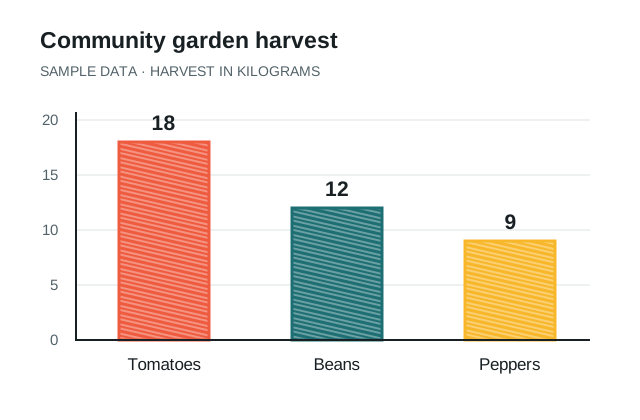
Community garden harvest
These made-up values are in kilograms. Paste the rows into the editor, or download the CSV and upload it.
Download sample CSV ↓Crop,Harvest (kg)
Tomatoes,18
Beans,12
Peppers,9Choose a chart that fits your story
| Your question | Whiteboard chart |
|---|---|
| Which category has the largest value? | Horizontal or vertical bar chart |
| How does a value change along a numeric scale? | Line chart |
| How is a whole divided into shares? | Pie chart with positive values |
| How do two numeric measurements relate? | Scatter plot |
For a classroom explanation, start with a few clearly labeled values. For a business presentation, use a specific title and include the units so viewers can understand the result as the drawing finishes.
Make the drawing part of the explanation
The whiteboard effect reveals the chart as it is drawn. Give your audience time to read the completed values, and use a short spoken explanation or slide caption to explain why they matter.
Prefer a darker classroom look? The studio also includes chalkboard charts. For an entirely different scene, describe your idea in the free AI animated chart generator.
Whiteboard chart questions
Can I use data from Excel or Google Sheets?
Yes. Export your spreadsheet data as a CSV file, then upload that CSV to Chart Poppers. Check the imported labels and values before playing the animation.
Can I put the animation in a presentation?
Yes. Download the MP4 and insert it into your slides as a video. Our PowerPoint guide walks through the steps. Use the PNG when you want a still chart.