
A comparison, in motion
How to make an animated bar chart
Pick an orientation and theme
In the theme gallery, choose a preview under Horizontal bar or Vertical bar. Try whiteboard drawings, night-sky effects, garden scenes, or city construction.
Enter categories and values
Use one label and one numeric value per row. Paste your data and select Use this data, or upload a CSV file. Use consistent units across categories and check the numbers shown in the editor.
Customize the presentation
Add a descriptive title, adjust the animation duration, and use the AI editor for changes such as colors, fonts, or scale. Play the result and check the final values, then download an MP4 video or PNG image.
Try it with these numbers
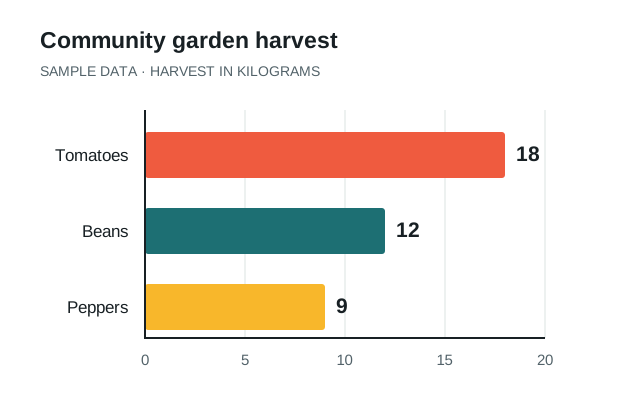
Community garden harvest
These made-up values are in kilograms. Paste the rows into the editor, or download the CSV and upload it.
Download sample CSV ↓Crop,Harvest (kg)
Tomatoes,18
Beans,12
Peppers,9Horizontal or vertical bars?
| Orientation | Useful when | Example |
|---|---|---|
| Horizontal bars | Category names are long or the comparison is a ranking. | Results by department, product, or survey answer. |
| Vertical bars | Labels are short and the order matters. | Monthly totals or harvest amounts by crop. |
For an honest comparison of positive values, keep the baseline at zero and use the same scale for all bars. Include units in the title or labels. If you need to show a continuous trend, consider a line chart in the studio instead.
Choose a visual idea that supports the numbers
Whiteboard bars suit a step-by-step explanation. City construction can give a growth comparison a recognizable setting. Garden themes offer another way to illustrate progress. Preview the scene with your data to make sure the motion helps the audience follow the comparison.
Have a different idea? Use the AI animated chart generator to describe a custom scene around your exact data.
Animated bar chart questions
Can I create a bar chart from CSV?
Yes. Upload a CSV with category labels and numeric values, like the sample above. If your data is in a spreadsheet, export the relevant columns as CSV first.
Are these racing bar charts?
These charts animate a set of category values into their final positions. A bar chart race changes values and rankings across multiple time periods; that is a different format.
Can I download a chart video for free?
Yes. Use Download MP4 for an animated chart video, or Download PNG for a still image. Follow the PowerPoint tutorial to place the MP4 in a presentation.